We all have our horror stories of how a misconfigured oscilloscope can lead to hours of head-scratching frustration. My latest problem cost me about 30 minutes of troubleshooting. Just yesterday, I was butting heads with a simple triggering issue on my new scope.
Having been fortunate enough to work with high-quality tools in the past, I recently decided to upgrade the equipment in my home office. The tools I was accustomed to were quite expensive, roughly equivalent in cost to a new car. That price was more than I needed to spend for my purposes. So, I opted for the RIGOL 1000Z series oscilloscope, a more budget-friendly choice. While it’s a step down from the HP 54645D I used to use in terms of channels and software features, it actually offers better resolution on its two channels.
My new scope’s ability to trigger on bus protocols is crucial for my work, as I often find myself developing the interface between devices and external peripherals. Yesterday, I attempted to capture an I2C transaction to demonstrate what to look for and why using a scope might be preferable over a logic analyzer. I set up my capture of SCL and SDA as two analog channels and configured the trigger on Channel 2 (SDA), falling edge, to get the START signal. I knew the scope could trigger on the I2C bus, so I went into the trigger menu, set up the two lines SCL on CH1 and SDA on CH2, and set the event to type to be START. The damn scope would not trigger! I had my Saleae hooked up in parallel, so I knew the events were happening, but I could not convince my scope that they were there.

As I said, I’ve been around scopes for quite some time. With the HP mixed signal oscilloscopes (MSO) at work, I typically had a license for the I2C and SPI protocol analyzer software features. With that MSO, as soon as I put it into protocol decode mode, everything worked wonderfully. Typically, I used digital channels. I never had a problem finding my triggers.
So, back to the RIGOL? What was going on? It’s a two-channel analog scope, and I had it on protocol mode. There was one assumption I was making, and that was protocol mode knew what it was doing. It generally does, and the complex pattern triggering is enabled. I2C start is equivalent to setting up a pattern trigger, in my case, CH1 high, CH2 falling edge. The I2C is just a shortcut method for a pattern trigger. So, I tried the pattern trigger, setting it up for a falling edge SDA with SCL high. There was the trace I was looking for.
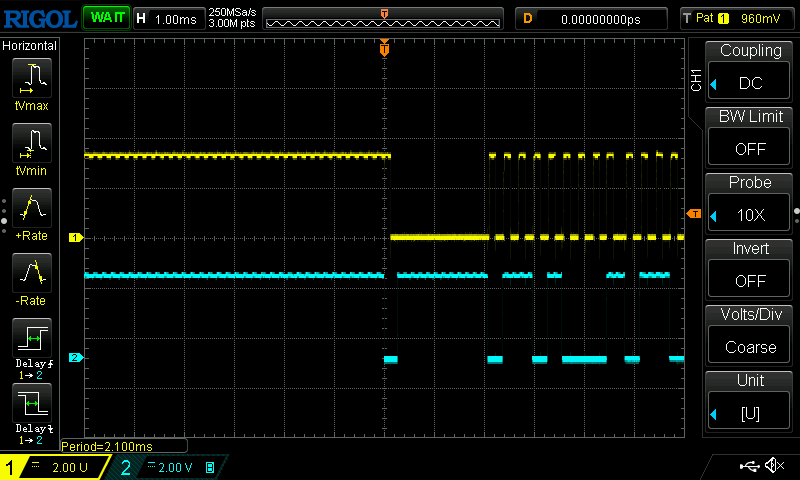
Getting back to the protocol triggers, the I2C triggers available are
- START
- STOP
- RESTART
- address pattern
- data pattern
- missed ACK.
Missed ack is a really complex trigger, SDA High with SCL rising edge on every 9th clock after START or RESTART. Can you imagine setting that one up just using front panel controls? So, the patterns, counts, and delays are all pre-configured for you. There is one part of it that is not baked in. It turns out that even on a protocol trigger, you still need the trigger levels to be set. I didn’t figure this out until I had moved my pull-ups from the 3v3 rail to the 5v rail. I started wondering if the scope only understood 5V TTL for the “digital” protocol analysis. I looked at the scope and still didn’t see anything wrong, apart from the lack of reaction to the event. Then I did what none of us ever do; I opened the manual.
After a quick search, I found that the trigger level for I2C is not part of the presets. Did I ever feel foolish? Not only that, but SCL and SDA trigger levels are independent values when triggering based on the protocol. As soon as I set the trigger to a sensible level, all was good.
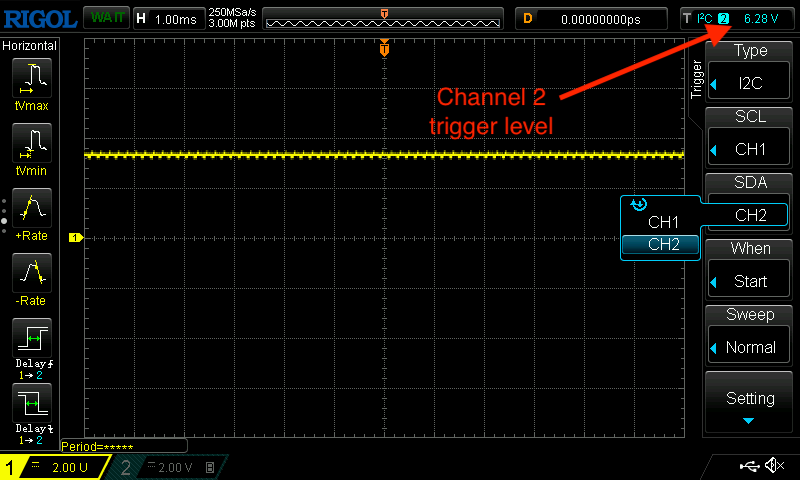
The moral of the story? Always read the manual (RTFM). It’s easy to assume we know what we’re doing, especially in an age when many modern user interfaces are designed for intuitive ‘discovery.’ Personally, using a scope feels almost reflexive, like second nature. However, every time I switch models or, even worse, change brands, I find that I get a little lost. While there are usually a few prominent knobs and standard buttons for key features, the layout can vary significantly. The RIGOL uses one knob for both channels and a slew of soft keys on either side of the screen. In contrast, my last work scope, running Windows 7, had a touch screen and a set of knobs for each channel, a very different experience entirely. They all take a bit of learning, and that’s why they write user manuals.
Also, just remember:-
There are lies, damned lies, and what’s on the screen of the oscilloscope.
Revisions
- 16 Oct, 2024
- Minor grammar fixes.
- Minor rewording for flow.
 Glorified Plumbing