I write a lot. Personal letters and postcards are written using pen and paper. Work documents are mostly typed in Markdown, often within a Git repository. Markdown is a fast, clean way to compose text.
As we update our technical docs, we put them through a review cycle much as we do with our code. We are interested in the flow and accuracy of the whole document, but the key focus is on the changes.
Diffing Markdown
Diffing two versions of a Markdown file will result in line-by-line comparisons. When I type in MS Word or WordPress I only hit [ENTER] at the end of a paragraph. Okay, on some computers, that’s [RETURN]. That signifies a paragraph break to the tool.
The result of this style of editing is that every paragraph is delineated by a single line end marker. In a Git repository, diffs are line-based. You end up comparing paragraphs. These are very long lines. Depending on how you render your diffs, you will either have to pan a long way right to find changed words or sentences, or the diffed paragraphs will wrap, and changes may not appear aligned side-by-side in your viewer.
To limit the scope of your diff, you can use semantic line breaks in several document file types.
- Markdown
- LaTeX
- AsciiDoc
- reStructured
As I said before, I use Markdown. If I use a single vertical whitespace (press enter once), the source text is shown on a new line, but the rendering in the final format will not. To force a paragraph break, I just add a blank line between.
The final document, using a markdown viewer (built into GitHub for example), or processed by a tool like Pandoc (a publishing tool that can convert text formats), will render nicely in paragraphs. The source text will diff easily, each sentence (or shorter if you wish) handled as a unit.
Non-standard Markdown
I was enjoying this feature until last night when something tripped up one of my GitHub files in GitBook. I am maintaining my pages on GitHub, and it auto publishes a branch to GitBook.
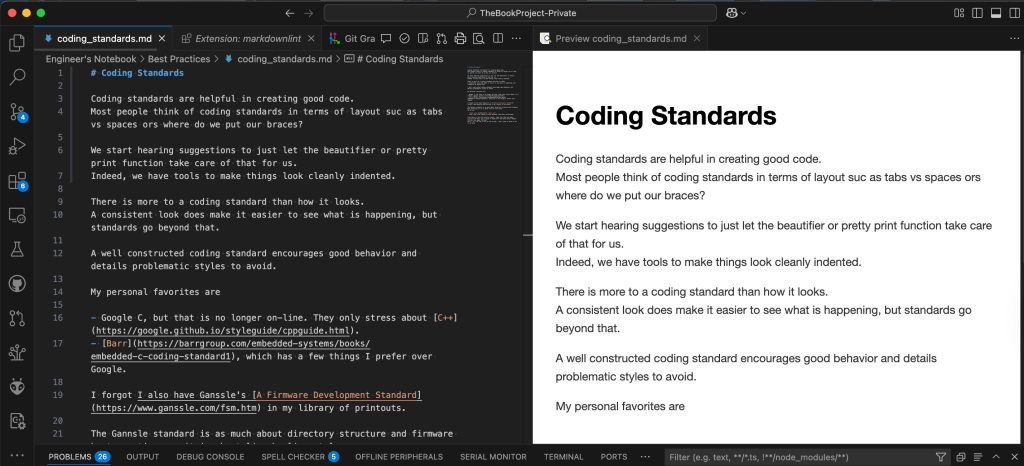
The Engineer’s Notebook I am building has a new Best Practices chapter about Coding Standards. It’s formatted like all my other pages, using semantic line breaks. But GitBook is placing each line on a line. It’s not seeing paragraph breaks, though. A paragraph should have a specific spacing, which can be seen where I put a double newline. I did finally take the semantic line brakes out of this file.
This is using the previewer in VSCode where semantic line breaks are understood.

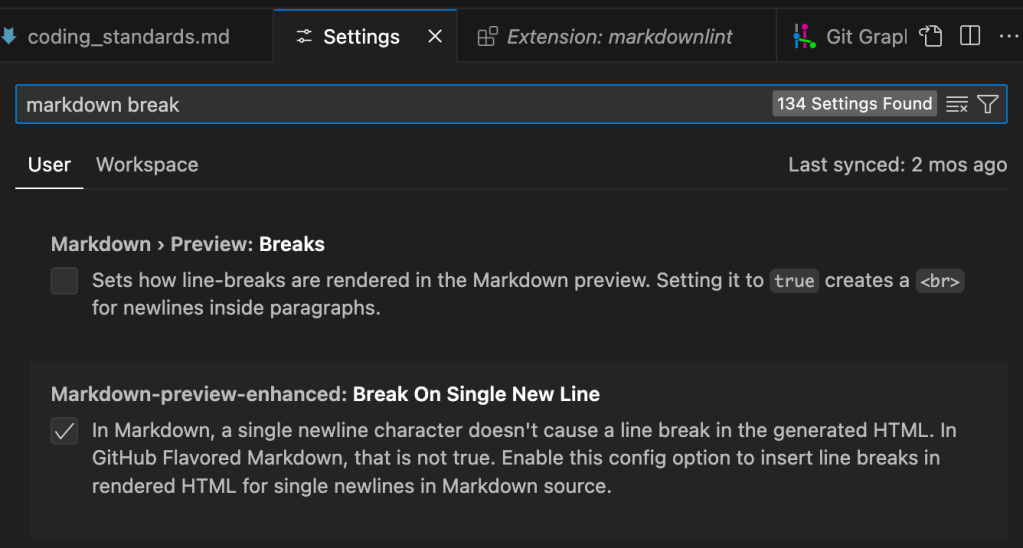
I then changed the setting for enhanced preview.
The result was how I saw it in GitBooks.
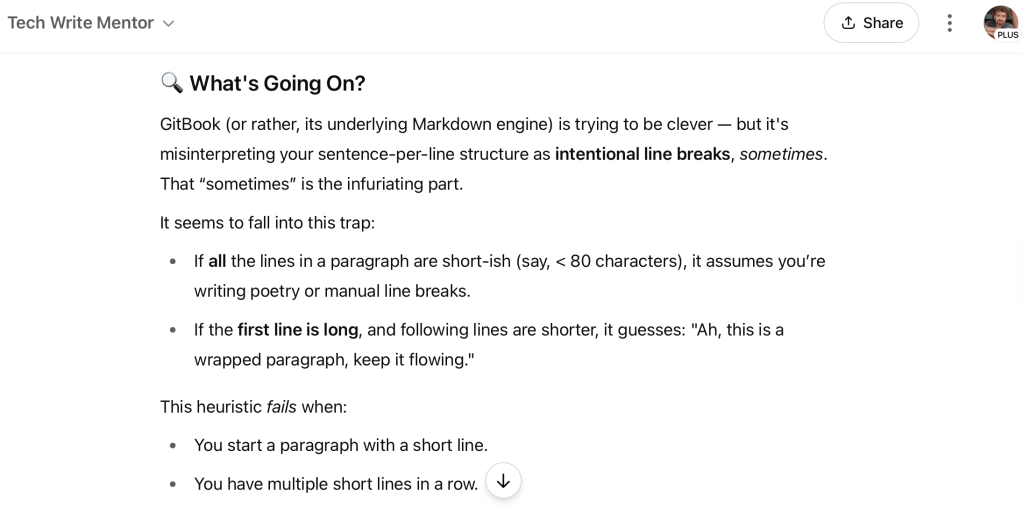
I tried a web search and a ChatGPT session to try and work out why this was the first page to render this way. ChatGPT came up with a response about how the tool was trying to render it in a poetic way, based on sentence length in the first paragraph. That sounded like a hallucination. I have not found evidence one way or the other.
What the Internet Says
This morning, I did a bit more looking into it and found a page that feels informative, or at least definitive. https://sembr.org links to a page that discusses semantic breaks. I think it describes common attributes, and then has a call to action to unify the behavior; or at least that’s my take on it.
A few years ago, a colleague introduced me to semantic line breaks in the context of diffing README.md files. I learned the how and why together. In last night's searching, I found someone who only half knew the why. Their post (and its responses) highlight the perils of navigating different dialects of Markdown.
What GitBooks Support Said
Thank you for your message and patience here so far.
Our team is aware of this and we are looking into this on our side.
I’ll keep you posted on the progress.
and then later
Thank you for your message and patience here so far.
Our team has issued a fix for this and you should now be able to work this out. Can you confirm if the line breaks are now working as expected?
Summing Up
This was just meant to be a short post, and I think I said all I wanted to say. To recap
- Semantic Line Breaks are a convenience to break paragraphs into smaller blocks for you and your computer to work with.
- Easier for diffs
- Easier to focus on
- Mostly do not disrupt paragraph print formatting and style.
- Not all Markdown viewers agree on dialect
- GitBook is great when hooked up to GitHub, until it isn’t.
- ChatGPT is a great tool, but I still don’t trust it all the way.
So, what are your thoughts on Markdown? Have you tripped up on anything when moving your Markdown to other platforms or tools? Do you use semantic line breaks, and if so, what is your motivation?
I look forward to your comments and questions.
Post script
Thanks to a comment from someone at InnerSource, I followed up on the GitBook issue. It was an acknowledged bug that has since been resolved. The fix came within a week or so. I’m happy again.
 Glorified Plumbing
Re: “ChatGPT is a great tool, but I still don’t trust it all the way.”
My view:
1. Never trust ChatCPT, as well any of the search engines (such as Google, Bing)2. Think yourself as a ‘detectorist’ using any/all of the above tools as your metal detectors to pick up specimens underground.3. You will have to use your own experience/judgement to select the best specimen detected and perform your own final validation, using some independent trustworthy tools (perhaps, Wiki, if applicable.)
Still, you’d end up with some junk time to time, but in general, this works for me.
LikeLike
Hey, we at InnerSource Commons saw a similar issue with our usage of Gitbook, although we are not really complying to semantic line breaks, as we are breaking mid sentence. Nevertheless, you may want to check my detailed analysis of the problem at https://github.com/InnerSourceCommons/InnerSourcePatterns/issues/805#issuecomment-2940430261 and join our chorus by reporting it to the Gitbook support – https://gitbook.com/docs/help-center/further-help/how-do-i-contact-support.
LikeLike
Thanks, I’ll follow up on that.
There was enough talk on the internet that I was thinking of it as “how it’s done” and “not a bug”, so I never reported back a “feature request”.
Following your links now.
LikeLike
Thanks, I’ll follow up on that.
There was enough talk on the internet that I was thinking of it as “how it’s done” and “not a bug”, so I never reported back a “feature request”.
Following your links now.
LikeLike
I actually did file that bug with bug with GitBooks.
They came back with a response quite swiftly, saying that they knew about the issue. Then yesterday (24 June 2025) I was notified of the fix.
I went straight to my GitBook, and saw that things were still messed up. I wasn’t too surprised as I had older pages where semantic line breaks seemed to work. I started thinking that I needed to touch the page and create a commit on the published branch to get the markdown re-rendered into whatever format the end user sees. That did the trick.
So, it’s fixed, but I think the impacted pages need to be re-published by me.
The important thing is that new pages will show up nicely.
Thanks for nudging me to report a bug. I am always asking my users to tell me about everything that feels wrong in my code. I should remember to always give other developers the same courtesy, and complain to them more often.
LikeLike